Innkeeper: Why Didn’t I Think of This Sooner?
Running a Discord server is a long list of small, fiddly clicks: a role here, a channel there, the right permissions on each one. Why didn’t I think of getting some help with that sooner?
Claude isn’t driving here. It’s more like a helper behind the bar. It works out what needs to change and writes up the exact plan, and I’m the one who says go. The project’s instructions tell it to show me every plan in plain words, including who gains or loses access, and wait for an explicit “apply”. The tools it works with can create channels, change permissions and post as the bot, but none of them can delete anything. That was in the very first commit, along with a rule that every change has to be rehearsed before it’s allowed to happen.
Innkeeper looks after the Fort, a private, invite-only server for my friends, with spaces for D&D, World of Warcraft, 3D printing and card games. I built it to learn about Discord bots, AI and home servers, and most of what’s here happened over two days, November 6th and 7th. It’s completely separate from Chronicler’s Companion, with its own repo, Discord application and token. It comes in two halves:
- The bot handles role-picker buttons, anonymous feedback, and a couple of slash commands.
- An admin MCP server gives Claude Code tools to audit the server and set up channels and roles.
Rehearse, then apply
Every write tool defaults to dry_run: true. A dry run changes nothing. It returns the exact list of changes it would make and a confirm_token. To apply the plan, the tool gets called again with the same arguments and the token, and the token has to survive this:
consume(tool: string, args: unknown, token: string | undefined, fingerprint: string): string | null {
  if (!token) return 'confirm_token is required when dry_run=false. Run a dry run first.';
  const p = this.pending.get(token);
  this.pending.delete(token); // single-use, even on failure
  if (!p) return 'Unknown or already-used confirm_token. Run a fresh dry run.';
  if (p.expires < this.now()) return 'confirm_token expired (10 minute limit). Run a fresh dry run.';
  if (p.tool !== tool) return `confirm_token was issued for ${p.tool}, not ${tool}.`;
  if (p.argsHash !== hashOf(args)) return 'Arguments differ from the dry run this token was issued for. Run a fresh dry run.';
  if (p.fingerprint !== fingerprint)
    return 'The server changed since the dry run, so the plan is no longer the same. Run a fresh dry run and review it again.';
  return null;
}
A token works once, for one tool, with those exact arguments, for ten minutes. The last check matters most: the plan gets fingerprinted, so if someone changes the server by hand between the preview and the apply, the apply is refused. What you approved is what happens, or nothing happens. The token can’t prove a person actually read the plan, though. That part is the instruction to wait for me, plus me reading it.
Tokens live in memory, so restarting the server cancels anything pending. Every applied change gets appended to a log with its before and after. Deleting stays a manual job in Discord.
The Fort’s topic channels and house rules were set up with these tools, and the rules went up as a post from the bot:
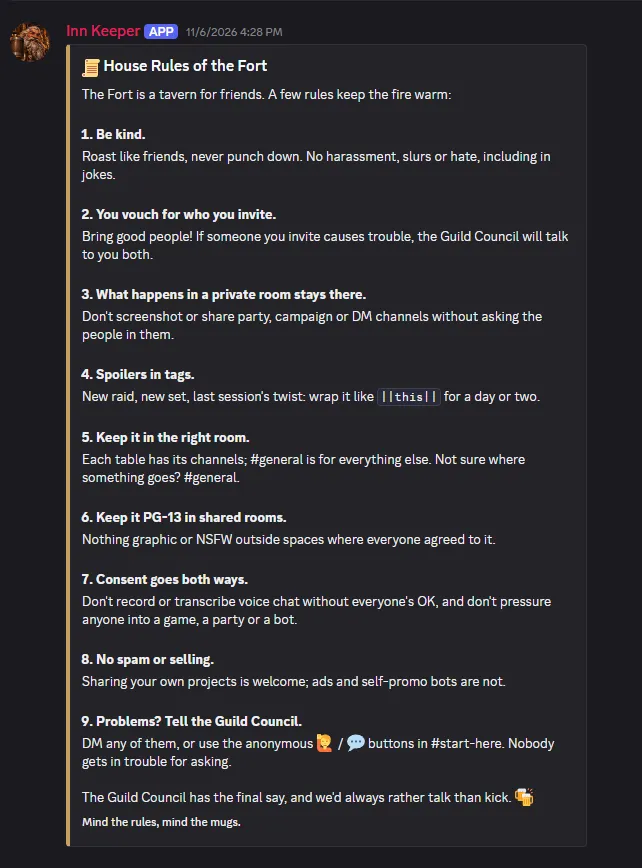
Rule 7 applies to the bots as much as the people: don’t record or transcribe voice chat without everyone’s OK, and don’t pressure anyone into a game, a party or a bot. The same idea sits behind the feedback buttons below and the opt-in voice notes in Chronicler’s Companion.
A bot that can’t read the room
The bot connects with a single gateway intent, Guilds:
const client = new Client({ intents: [GatewayIntentBits.Guilds] });No Message Content, no Server Members, no Presence. It can’t read chat, because it never asked to. These are my friends’ conversations and it has no business in them.
That goes further with the feedback buttons on the bot’s announcement posts. One of them says I’d rather the bots weren’t here. It’s one click, relayed anonymously, and the bot stores nothing. If you’re going to put AI in a friends’ server, there should be an easy way to say you don’t want it.
Thorin has no tools
/ask is an AI Q&A open to a few hand-picked people, with a default limit of 20 questions per person per day. It answers as Thorin “Keg-Slinger” Bronzebeard, a dwarven tavern keeper with a static set of notes about the Fort’s features. It’s a plain text completion and nothing else. Thorin has no tools, can’t see messages or members, and is never handed roster data. The usage database stores counts and never the questions or answers.
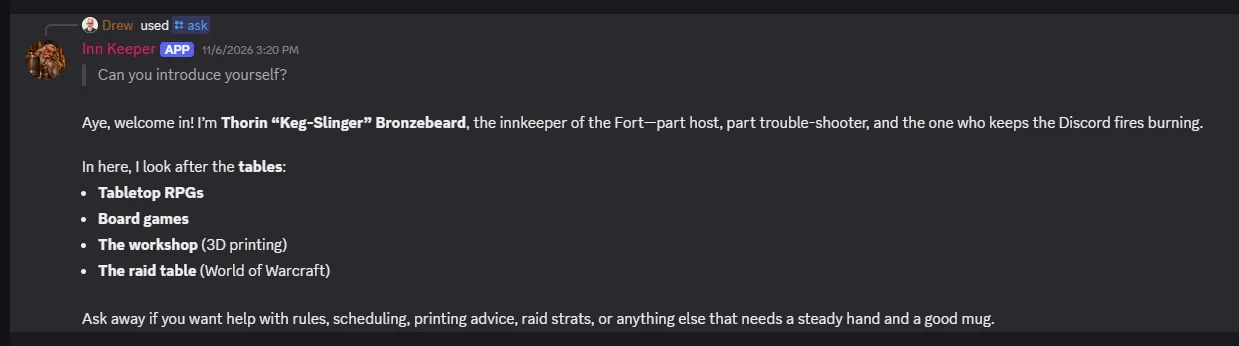
Here he is on his first day, introducing himself:
Later that afternoon I asked him to pass something along to the guild, and he told me he couldn’t:
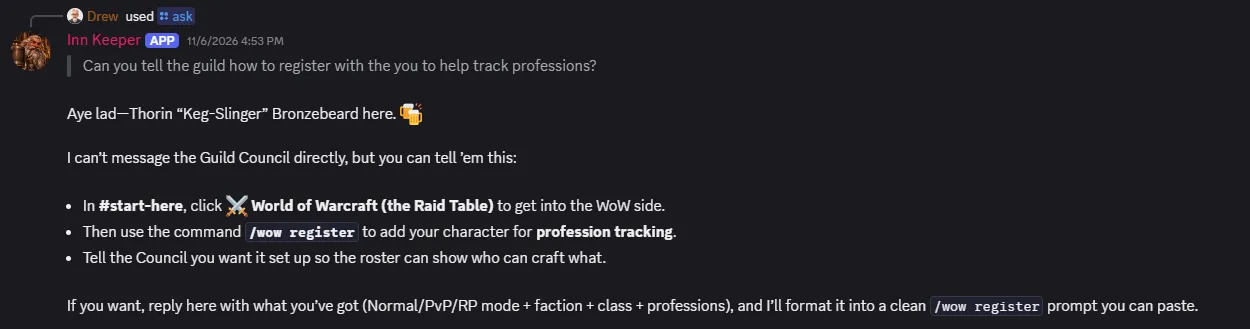
That’s the design doing its job: he can only answer, so he says so and tells me what to do instead. It’s also a snapshot of how fast things moved. The mode and faction he asks about were gone from the form by the next day.
Keeping it that way is a job for a build step, because “the AI part can’t touch the admin part” is the kind of rule that erodes one convenient import at a time. scripts/check-isolation.mjs fails pnpm check if src/ask/ imports anything beyond itself, the model SDKs and Node built-ins:
for (const [re, what] of [
  [/\btools\s*:/, 'a `tools:` field'],
  [/\btool_choice\b/, 'tool_choice'],
  [/\bfunctions\s*:/, 'a `functions:` field'],
  [/\bfunction_call\b/, 'function_call'],
  [/\bmcp_servers\b/, 'mcp_servers'],
  [
    /\bprocess\.env\b/,
    'process.env (config must be passed in, so the module never sees the Discord token)',
  ],
])
  if (re.test(text))
    errors.push(`${rel}: contains ${what}; /ask must be a plain completion with no tools`);
It’s a pile of regexes, not a sandbox, and someone determined could walk around it. It’s there to catch me (or an agent working for me) doing something careless at 11pm, and for that it’s enough. Pointing /ask at a local model is a config change, which is the direction I’d like to go.
Discord forms are small
/wow is an opt-in roster for WoW: Forever. People list their characters and professions, find crafters, and can wipe all of it with /wow forget. The first version took a day. Then it met reality.
One guild. I’d built support for several guilds, modes and factions. In practice the Fort has one guild, Alliance on Normal, so the form stopped asking. The database columns stayed, so a second guild wouldn’t need a migration.
Two names. WoW: Forever characters have a first and last name, which I only found out after the form was built.
Five fields. Discord forms allow at most 5 fields and 25 options per dropdown, and one dropdown can’t depend on another. First and last name ended up sharing one text box to make room for spec. The spec dropdown has its own bit of luck: Classic has 27 specs, which is over the limit, but Holy, Protection and Restoration each belong to two classes, leaving 24 unique names. It fits with one slot to spare. Since the form can’t narrow specs by class, the bot checks the combination after you submit:
else if (c.spec && !SPECS[c.class as keyof typeof SPECS].includes(c.spec))
  problems.push(`${c.class}s don't have a ${c.spec} spec. ${c.class} specs: ${SPECS[c.class as keyof typeof SPECS].join(', ')}.`);
Who gets in. Guild access requests started out going to a council channel. They moved to guild chat so anyone already in the guild can let someone in, and it’s still always a person clicking Approve. The bot can’t verify self-reported text, so it never decides.
The small stuff went wrong too. Typing a new character name into the register box returned “not found” until it counted as a new character. And a manual data fix blew up on a missing spec column, because a running bot only migrates its database at startup.
A web page for the things that want a screen
Some jobs are just easier on a screen than through Claude Code, so there’s now a local admin page for editing the roster, reading the change log and /ask usage, seeing who can see what, and posting as Thorin. It uses the same front-end approach as the Chronicler console: Lit with light DOM for anything stateful, CSS-only layout elements, design tokens, and two themes called Taproom and Hearth.
The most useful refactor was moving the dry-run engine out of the MCP tools into a shared runWrite. The page’s Preview changes and Apply this plan buttons now go through the same code as Claude, so there’s only one way to change Discord.
It’s only reachable from my own machine, and I locked it down anyway: it listens on 127.0.0.1, requires a password, checks Host to stop DNS rebinding, requires a same-origin Origin plus a custom header on every change, and sends a strict Content-Security-Policy. A local admin panel is a nice target for a malicious web page open in another tab.
Two things bit me on the way:
- The strict CSP bans inline scripts, so the little “set the theme before first paint” snippet had to become its own file.
- A Lit method I named
removeclashed with the built-inHTMLElement.remove.
The Roster page also has a Move button, and it exists because of a real mistake: a character registered on someone’s behalf landed on my account, with no way to hand it over.
Running it from WSL
Discord traffic is outbound only, since the bot dials Discord’s gateway, so nothing has to be exposed to the internet. It runs as a systemd user service inside WSL. The catch is that WSL shuts its VM down when no Windows process is using it, which takes the bot with it. The fix is delightfully dumb: a Windows scheduled task at logon that runs sleep infinity inside WSL to hold it open.
wsl.exe -d Ubuntu --exec sleep infinityThe longer-term idea is to move it to a Pi or Mac mini.
What’s next
I looked into pulling gear and professions from Blizzard’s Battle.net API and haven’t built it. Character lookups need a realm in the URL, WoW: Forever has no realms, and I don’t yet know whether the API covers Forever at all. That needs a small probe script before anything else.
There’s also a collision coming. Chronicler’s Companion plans its own /ask, for campaign recall. Discord will let two apps register the same command, but one Thorin and one campaign archivist answering to the same name is asking for confusion, so if they end up on the same server one of them is getting renamed.