Root Meridian Part 4: The Compass Gets a Voice
Last post ended with motor and audio validated on the bench — the first time the thing made sound on real hardware. The closing line was: “next step is making it run from Discord instead.”
Tonight that happened.
The Architecture
The control path I had in mind from the start:
DM types /compass east in Discord
  → Discord bot (Node.js) receives the command
  → bot sends GET /compass?dir=east to the ESP32
  → ESP32 runs motorSeekTo(EAST)
  → needle moves
Two things needed building: the bot and the ESP32 web server. The firmware already had all the motor/LED/audio logic — it just needed an HTTP front door. The bot is new from scratch.
Adding the Web Server to the ESP32
The ESP32’s WiFi stack is built into the Arduino framework. Adding a web server is a few includes and a handful of route handlers. The pattern is close to Express in Node.js — register a path, attach a handler function.
The one wrinkle: the ESP32 has very limited RAM, and the String class in Arduino does heap allocations that can fragment memory in long-running programs. The fix is to use char[] arrays and snprintf instead of string concatenation wherever possible. More verbose, more stable.
Here’s what a route handler looks like:
#include <WiFi.h>
#include <WebServer.h>

WebServer server(80);

void httpCompass() {
  char dir[16] = {0};
  server.arg("dir").toCharArray(dir, sizeof(dir));

  if (!isValidDir(dir)) {
    server.send(400, "application/json", "{\"message\":\"invalid dir\"}");
    return;
  }

  actionCompass(dir);

  char resp[64];
  snprintf(resp, sizeof(resp), "{\"message\":\"compass → %s\"}", dir);
  server.send(200, "application/json", resp);
}
server.arg("dir") pulls the query parameter from GET /compass?dir=east. The response format matches the stub server I’d been developing against — same JSON shape, so the bot doesn’t need to know whether it’s talking to the real ESP32 or the fake one.
The routes register in setup():
server.on("/compass", HTTP_GET, httpCompass);
server.on("/spin",    HTTP_GET, httpSpin);
server.on("/gem",     HTTP_GET, httpGem);
server.on("/reset",   HTTP_GET, httpReset);
server.begin();
And loop() gets one new call:
void loop() {
  checkSerial();      // debug serial commands
  motorUpdate();      // AccelStepper needs to run every tick
  ledUpdate();        // rate-gated to 60fps internally
  server.handleClient();  // check for pending HTTP requests
}
The Shared Action Functions
Before adding HTTP handlers I refactored the serial command logic into shared action functions. Without this, every piece of compass logic would exist twice — once for serial, once for HTTP.
// Called by both serial and HTTP handlers
void actionCompass(const char* dir) {
  chaseActive = false;
  motorSeekTo(dirToSteps(dir));
}

bool actionGem(const char* player, const char* state) {
  int p = playerIndex(player);
  if (p < 0) return false;
  bool spent = (strcmp(state, "spent") == 0);
  playerMode[p] = spent ? MODE_SPENT : MODE_AVAILABLE;
  audioPlay(spent ? 4 : 5);
  return true;
}
The serial handler and HTTP handler both call actionCompass(). The logic lives in one place.
WiFi Connection
WiFi credentials live in a secrets.h file that’s gitignored — never in the sketch itself. The connection sequence in setup() tries for 10 seconds and logs the result:
WiFi.begin(WIFI_SSID, WIFI_PASSWORD);
uint8_t attempts = 0;
while (WiFi.status() != WL_CONNECTED && attempts < 20) {
  delay(500);
  attempts++;
}
if (WiFi.status() == WL_CONNECTED) {
  Serial.print("[WiFi] Connected — IP: ");
  Serial.println(WiFi.localIP());
} else {
  Serial.println("[WiFi] FAILED — running without network");
}
The serial monitor printed:
[WiFi] Connected — IP: 192.168.87.85
[3081ms] HTTP server ready on port 80
The ESP32 is on the network and taking requests. On to the bot.
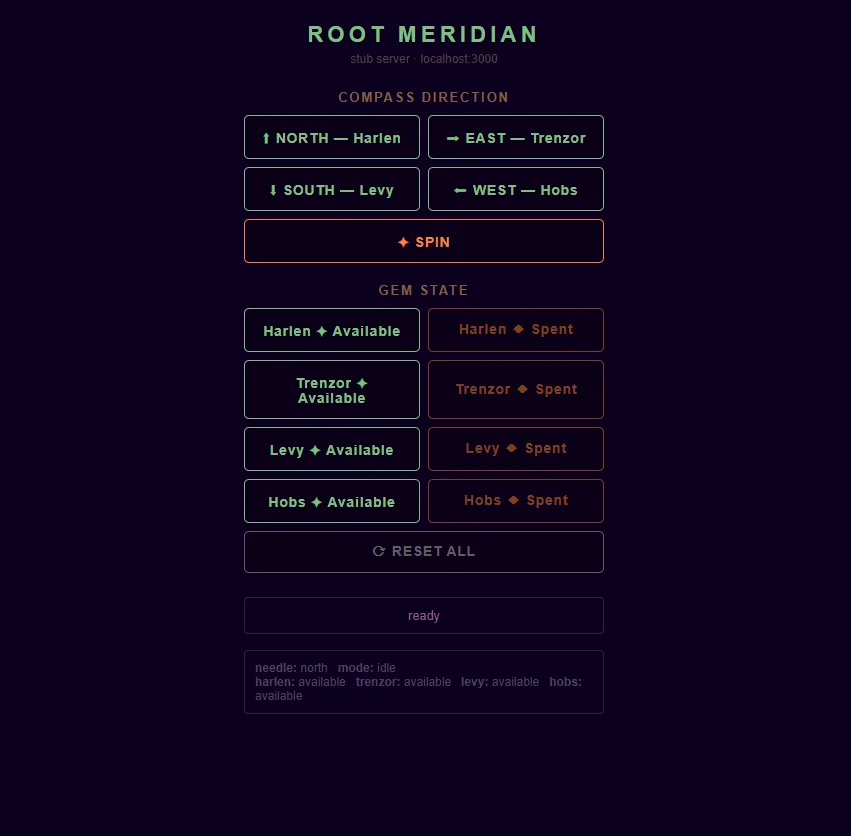
Before the Discord bot existed, all testing ran through a local stub server — a small Express app that mirrors the ESP32’s HTTP interface and lets you fire commands from a browser. This was the whole control panel at v0.1:
Building Chronicler

The Discord bot is called Chronicler. It uses Discord.js v14 and four slash commands: /compass, /spin, /gem, and /reset.
Slash Commands vs Prefix Commands
I chose slash commands over the classic !compass prefix style. The main reason: discoverability. When the DM types /, Discord shows all available commands with their options and descriptions inline. During a session, at 11pm, with players watching — that autocomplete matters.
The tradeoff is a one-time registration step. Slash commands have to be declared to Discord before they show up in the UI. That’s a script you run once, separate from running the bot.
The Command Structure
Each command is its own file that exports a data object (the command definition) and an execute function (what happens when it’s used).
The /spin command is the simplest:
const { SlashCommandBuilder } = require('discord.js');
const { get, errMsg } = require('../lib/compass');

module.exports = {
  data: new SlashCommandBuilder()
    .setName('spin')
    .setDescription('Send the compass into an erratic spin — dramatic lock-on reveal'),

  async execute(interaction) {
    await interaction.deferReply();
    try {
      await get('/spin');
      await interaction.editReply('The compass spins wildly... something stirs in the roots.');
    } catch (err) {
      await interaction.editReply(`Could not reach the compass: \`${errMsg(err)}\``);
    }
  },
};
deferReply() is important. Discord gives you 3 seconds to acknowledge an interaction before it shows “The application did not respond.” Since the bot has to wait for the ESP32 to respond, deferring immediately — then editing the reply once we have an answer — keeps Discord happy.
The /compass command adds a required string option with fixed choices:
data: new SlashCommandBuilder()
  .setName('compass')
  .setDescription('Point the Root Meridian to a cardinal direction')
  .addStringOption(opt =>
    opt.setName('direction')
       .setDescription('Where should the needle point?')
       .setRequired(true)
       .addChoices(
         { name: 'North — Harlen (Topaz)',    value: 'north' },
         { name: 'East  — Trenzor (Emerald)', value: 'east'  },
         { name: 'South — Levy (Ruby)',        value: 'south' },
         { name: 'West  — Hobs (Diamond)',     value: 'west'  },
       )
  ),
The choices include player names and gem types. In the Discord UI this renders as a dropdown — the DM sees “North — Harlen (Topaz)” and selects it, the bot receives "north" and forwards it to the ESP32.
The Shared HTTP Helper
All four commands talk to the same ESP32 endpoint format. Rather than repeating the base URL construction and error handling in each file, there’s a small shared module:
// bot/lib/compass.js
const axios = require('axios');

async function get(path, params = {}) {
  return axios.get(`${process.env.COMPASS_IP}${path}`, { params });
}

function errMsg(err) {
  return err.code || err.message || String(err);
}

module.exports = { get, errMsg };
errMsg exists because axios network errors sometimes have an empty message but always have a code — ECONNREFUSED, ETIMEDOUT, etc. Without this, error messages were showing as empty backticks in Discord, which was useless.
Deploying vs Running
Two separate steps, run separately:
node deploy-commands.js   # registers slash commands with Discord — run once
node index.js             # starts the bot and listens for interactions
Registration is persistent on Discord’s side. Once commands are registered, they show up in the UI even when the bot is offline — they just won’t respond until the bot is running. You only re-run the deploy script when you add or change a command.
Guild registration (registering to a specific server) is instant. Global registration — which applies across all servers the bot is in — takes up to an hour to propagate. For a single private server, guild registration is the right choice.
The Network Problem
The bot started, connected, showed Compass target: 192.168.87.85. The ESP32 was broadcasting that IP from its serial monitor. I ran /compass in Discord and got:
Could not reach the compass: ETIMEDOUTETIMEDOUT means the packet was sent but nothing came back. Not ECONNREFUSED (port open, connection rejected) — the IP wasn’t reachable at all.
ping 192.168.87.85 from the bot’s machine: all timeouts.
The problem: the ESP32 was connected to a phone hotspot (192.168.87.x is a classic Android hotspot subnet), and the laptop running the bot was on home WiFi (192.168.1.x). Two separate networks. The ESP32 might as well have been on a different continent.
The fix: connect both to the same network. Once the laptop joined the same network as the ESP32, ping replied in 80-100ms, and we were in business.
Port forwarding would only be relevant if I wanted to control the compass from outside my home network. For a prop sitting on a table at a D&D session, everything is local.
It Worked
I typed /compass east in Discord. Chronicler responded:
The needle turns… Trenzor calls it home. (east)
Serial monitor:
[339094ms] EAST
[339097ms] east
The stepper moved.
There’s something specific about watching a Discord message cause a physical object to move. The whole chain — keystrokes to Discord servers to Node.js to WiFi to ESP32 to motor driver to stepper coils — compressed into a single gesture. That’s the prop working.
The Adafruit Order Arrived
The NeoPixel ring and LiPo battery landed tonight. The full electronics stack is now in hand:
| Component | Status |
|---|---|
| HUZZAH32 ESP32 | Running ✅ |
| 28BYJ-48 stepper + ULN2003 | Working ✅ |
| DFPlayer Mini + speaker | Working ✅ |
| WS2812B NeoPixel ring 24x | In hand, not wired yet |
| 1200mAh LiPo | In hand |
The firmware already handles the NeoPixels. The LED code — gem quadrant pulsing, ember state, chase comet — has been in the sketch since the beginning. Wiring it is three connections: 5V, GND, data on GPIO 14.
What’s Next
Soldering session in the morning. The NeoPixel ring pads need proper joints rather than breadboard contacts, and once it’s live the whole prop — motor, LEDs, audio, WiFi — will be running together for the first time.
After that: housing design in TinkerCAD, sized around the confirmed electronics stack. The resin face plate. And then a D&D session where the party doesn’t know what’s sitting on the table until the DM types /spin.
One thing I didn’t expect: how much of embedded development is just network debugging. The firmware works; the problem is always which subnet you’re on.